
WhatsApp team inbox for agencies
One dock.
Every conversation.
- Every enquiry.
- Every complaint.
- Every reorder.
- Every approval.
Manage your WhatsApp conversations with your team from one place, with an owner on every client and nothing left waiting.
Support
+1 (512) 555 …
- All caught upreplied
MBTR
Sales
+1 (737) 555 …
- Jake Morrisonunassigned
TR
Main
+1 (512) 555 …
- Summit Dental Group1h 12m
- Harbor & Pine Realty2h 40m
- Brooklyn Bagel Co.18m
ECRCSM
Replied in 4m
Waiting 48m, Megan
Assigned to Tyler Reed
Clients message the main number, the sales number, a group, and someone’s personal phone. Nobody knows who owns the reply. Nobody knows how long they have waited. ConvoDock does.
Every WhatsApp number in one shared inbox.
Bring the numbers you already use into one workspace. Your groups, saved contact names and existing chats come with them, and older messages load from the phone when you need them.
- Main+1 (512) 555 0100
- Sales+1 (737) 555 0142
- Support+1 (512) 555 0199
- Client groups12
ConvoDock
- Sarah MitchellOwner
- Emily CarterAgent
- Ryan CooperAgent
- Tyler ReedSales only
This is the product.
Not a mock-up.
A one-minute tour of the real app: connect a number, reply in a client group, and clear the Waiting Board.
Recorded in the real app. Names are illustrative.
From four phones to one shared inbox in an afternoon.
Connect your number
Scan once. Your number stays yours.
Open WhatsApp on the phone that holds the number and scan the code shown in your workspace. It takes about a minute per number.
Nothing is ported. The number stays on your phone.
- Main numberConnected
- Sales numberConnected
- Support numberConnecting
Bring conversations in
Every chat in one shared inbox.
One-to-one chats and client groups arrive in your shared inbox, across every number you connect. Older messages load from the phone when you need them.
Groups show who said what, with replies and reactions.
- Summit Dental GroupGroup
- Harbor & Pine RealtyGroup
- Jake MorrisonDirect
Invite your team
Give each person the right access.
Add account managers as agents, give a sub-admin one number, and keep admin for yourself. Viewers can read without sending.
People only see the numbers and chats you give them.
- Emily Carter joinedAgent
- Tyler Reed runs the Sales numberSub-admin
- Megan Brooks joinedViewer
Assign and manage
Every client gets an owner.
Assign each chat to the person who handles that client, tag it, set a priority and leave internal notes the client never sees.
Unassigned chats stay red on the Waiting Board until someone takes them.
- Summit Dental Group to EmilyOwned
- Redwood Law GroupNote added
- Jake Morrisonunassigned
Respond together
Reply as a team, from one workspace.
Reply, send files and schedule messages from one place, and see who answered each client and when.
The Waiting Board updates as soon as someone replies.
- Emily replied10:09
- Megan scheduled Mon 10:00Queued
- Summit Dental GroupWaiting on client
Longest wait
1d 3h
Jake Morrison, unassigned
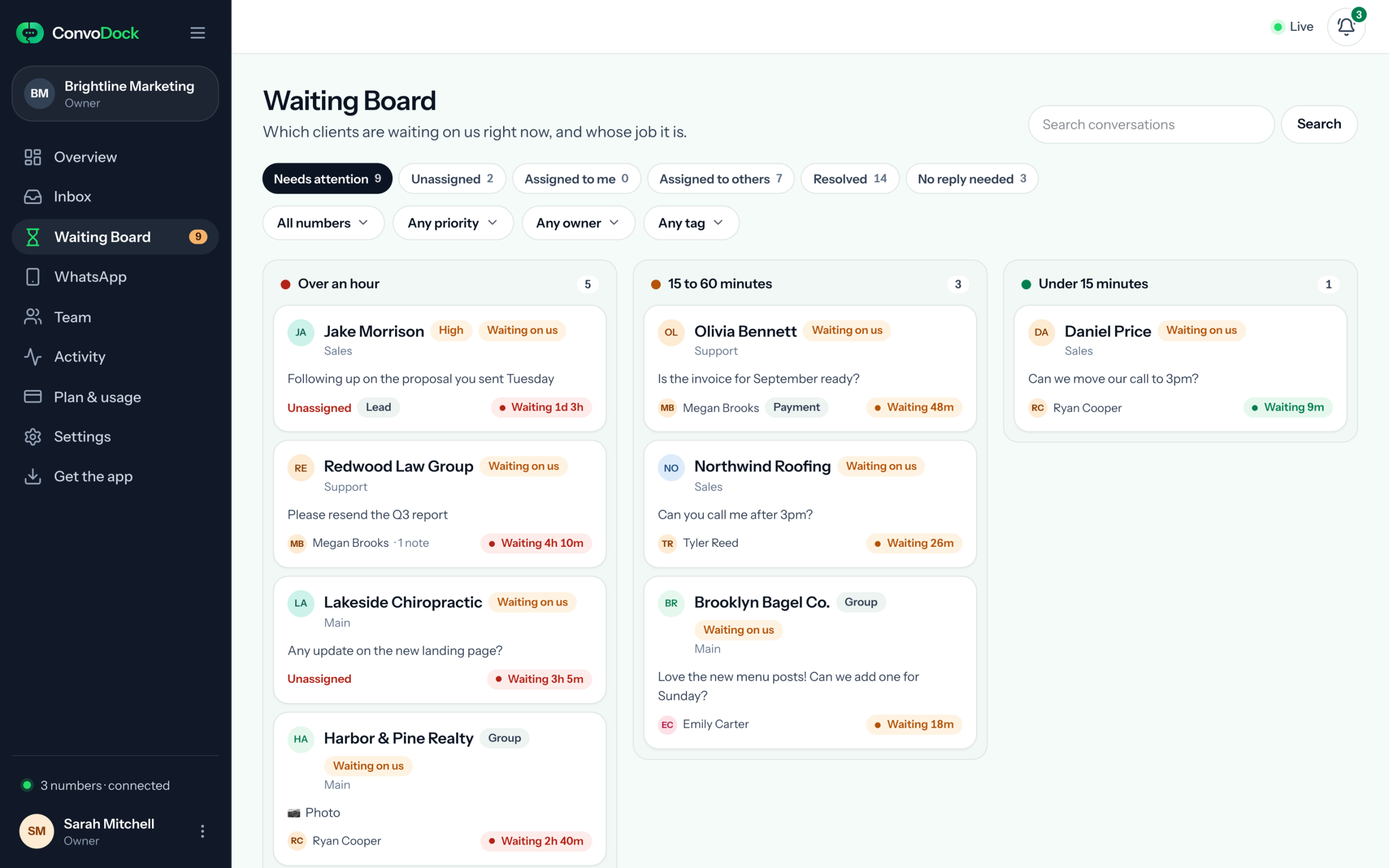
Waiting Board
The one question an agency owner actually has.
Which client is waiting on us right now, for how long, and who was supposed to reply.
- Every wait is timed. See how long each client has waited since their last message.
- Revives itself. “No reply needed” clears a chat until the client writes again.
- Owner visible. Unassigned is red for a reason.
- Jake Morrison1d 3h
Where this chat stands
- Last messageTue 11:31 AM
- Reply from your teamnone yet
- Ownerunassigned
Assign it and the board updates for everyone.
Your number is the asset. We built the product to protect it.
Reply-first limits
Built into sending
Messages to people who have never written to a number are capped at 20 a day, and 5 a day while a newly connected number settles in. No workspace setting can raise them.
No bulk sending
Built into sending
There is no broadcast, no CSV send and no message-all. Every send goes to one chat. ConvoDock is for conversations, not campaigns.
Human pacing
Built into sending
A typing indicator and a short pause before each message, at most one message every 2 seconds per number, and up to 300 a day. Sends queue visibly instead of bursting.
A gentle start for new numbers
Built into sending
For its first 14 days, a newly connected number sends at most 50 messages a day, and 5 a day to people who have not written first.
Workspace isolation
How your data is kept apart
Each workspace’s data is separated in the database with row-level security, backed by permission checks in the app, and the credentials that keep each number connected are encrypted with a separate key for each workspace.
Number health alerts
When something needs attention
If a number disconnects or is restricted, ConvoDock alerts you in the app so someone can act before clients notice.
Read how we protect your workspace, your team’s access and your conversations on the Security page.
Pay for people, not messages.
Starter
One WhatsApp number for a small team.
₹999 / month
≈ $10 USD
- 1 WhatsApp number
- 2 billable users
- 2 GB storage
Growth
More numbers, more people, more storage.
₹2,999 / month
≈ $30 USD
- 3 WhatsApp numbers
- 7 billable users
- 10 GB storage
Scale
For bigger teams, once storage allows.
₹5,999 / month
≈ $60 USD
Coming soon
- 7 WhatsApp numbers
- 15 billable users
- 25 GB storage
Extra seat ₹399 ≈ $4 USD, extra number ₹699 ≈ $7 USD, per month on any plan. 7-day trial on Growth capacity, no card. Billed monthly in Indian rupees; USD figures are for reference at ₹100 ≈ $1.
Questions agencies ask.
Anything else? Email hello@convodock.app and a person will answer.
Can several people use the same WhatsApp number?
Yes. Connect the number once and everyone you invite works in the same shared inbox, each with their own login. Every conversation can have an owner, so the team always knows who is replying. How this compares with the WhatsApp Business app.
Do I need the WhatsApp Business API?
No. You connect the WhatsApp numbers you already use by scanning a code shown in your workspace. It takes about a minute per number, nothing is ported, and the number stays on your phone.
How many WhatsApp numbers can I connect?
Starter includes one number and Growth includes three. You can add more numbers to any plan for ₹699 a month each.
Can I control what each person sees?
Yes. Give each person a role, choose which numbers they can see, and if you want, limit them to only the conversations you give them. Viewers can follow conversations without being able to send.
Do older messages come with the number?
Your existing chats appear as soon as a number is connected, and older messages load from the phone when you open a conversation and ask for them. The trial and Starter load the last 30 days; Growth loads as far back as the phone has.
Is there a free trial?
Yes. Every new workspace gets 7 days on Growth capacity: three numbers, seven people and 10 GB of storage. No card is needed.
Stop guessing who replied.
Set up in an afternoon. Free for 7 days. Link the numbers you already use and see who is waiting on you before the day is out.