
WhatsApp for sales teams
Every lead answered, by the right rep.
Leads write to your WhatsApp numbers from ads, your website and referrals. ConvoDock puts them in one shared inbox, gives every lead an owner and shows who is still waiting on a reply.
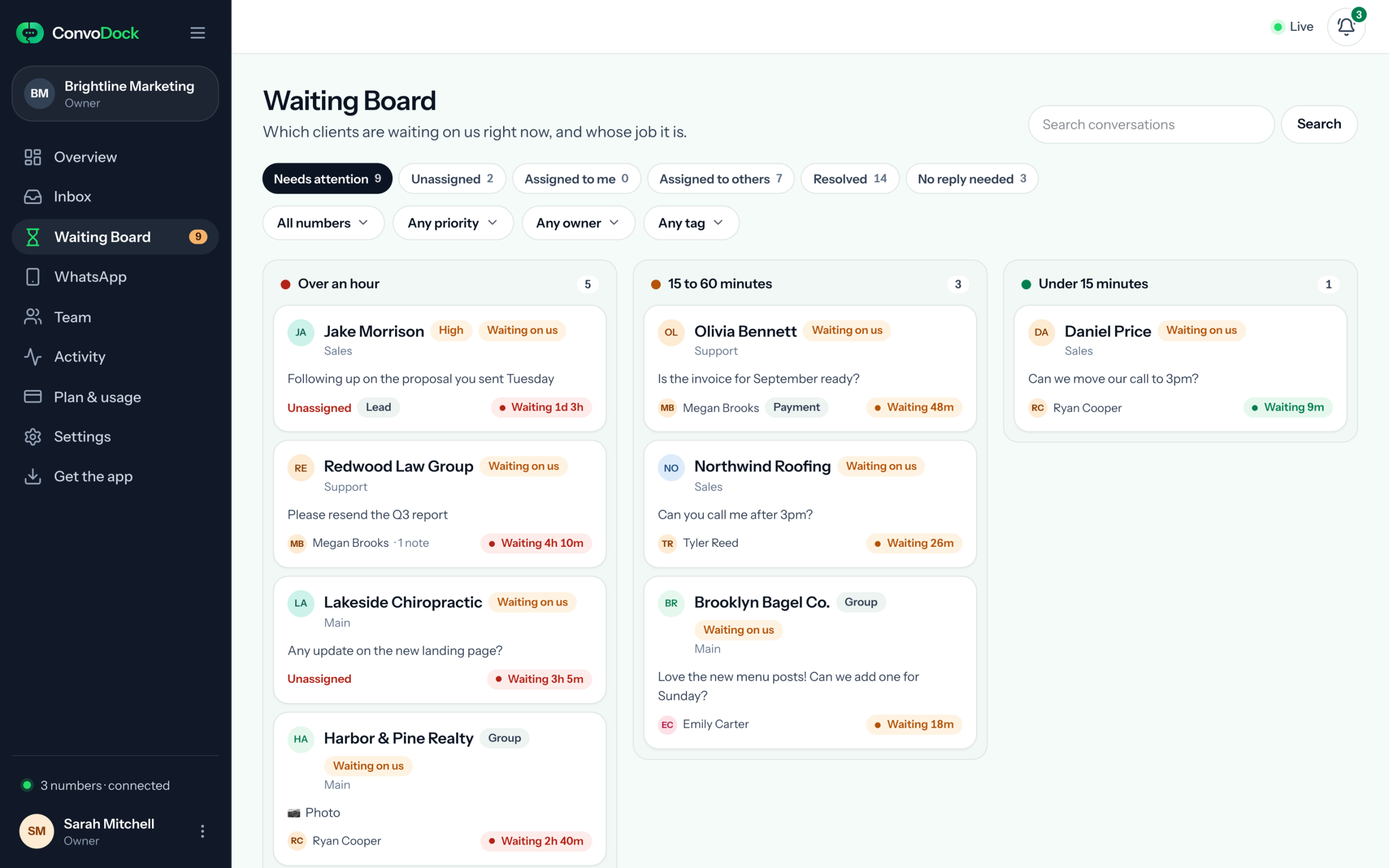
Owner · Tyler Reed
Waiting 48m
The real app. Names are illustrative.
In short: to use WhatsApp for sales as a team, put every sales number in one shared inbox, give each lead an owner, watch a board of who is still waiting, and schedule the follow-ups you promise. ConvoDock does all four on the WhatsApp numbers you already use.
Where leads go cold
Why WhatsApp leads slip through.
Leads rarely say no. They stop hearing back and ask someone else.
Leads land on one phone
The number on your ads rings one phone. Whoever holds it decides who gets each lead, if anyone does.
Nobody sees who is waiting
A lead who asked about price an hour ago looks the same as one you already answered.
Follow-ups live in reps’ heads
“I’ll send the quote on Monday” is a promise in one rep’s memory, until they are on leave.
From first message to follow-up
Your WhatsApp sales funnel, run as a team.
Four stages, each with someone responsible for it.
- Capture Leads write in from Click-to-WhatsApp ads, your website, QR codes and WhatsApp links, on whichever number they found. Every one lands in the same inbox.
- Qualify Tag them Lead, set a priority and leave a note for the next rep. Urgent leads go to the top of the board.
- Close The owner sends the quote, files and documents from the shared inbox, and every reply shows which rep sent it.
- Follow up Schedule the follow-up you promised, up to 30 days ahead. When the lead writes back, the chat is back on the board.
How sales teams run it
One inbox for every lead.
Every rep works from the same list, with their own login, whichever number the lead wrote to.
An owner on every lead
Take a lead or assign it. The owner shows on the chat and on the board, and Mine shows each rep their own leads.
Who is still waiting
The Waiting Board lists every lead whose last message has no reply, how long they have waited and who owns it, Urgent first. Put it on the sales-floor TV with a private link.
Every sales number, one inbox
Ad numbers, a number per region or per rep team, side by side. Filter by number, tag or Unread.
Find any lead fast
Search by name or by what was said, across every number you can see.
Who said what to whom
Every reply sent from ConvoDock shows which rep sent it, and the Activity log keeps assignments and handovers.
Leads stay with the business
Hide customer phone numbers from reps. When a rep leaves, remove their login: the conversations stay with you to reassign.
Which setup fits
The app, an API tool or a team inbox?
Pick by what your sales team actually does all day.
The WhatsApp Business app
One phone and a few people who can all see everything. Free to download. How it compares.
A WhatsApp API tool
Broadcasts, chatbots and approved message templates at volume. Pick one if outbound campaigns are the job.
ConvoDock
A team answering leads on the numbers and client groups you already use, with an owner on every lead and a Waiting Board.
Not for cold outreach. ConvoDock can’t start a brand-new chat or send in bulk, and messages to people who haven’t written first are capped at 20 a day per number, on every plan. That protects your numbers.
Best practices
How good sales teams work WhatsApp.
What we’ve learned answering leads on WhatsApp every day.
- Reply while they’re still interested. Work the board from the top: Urgent first, then whoever has waited longest.
- One owner per lead. Assign every new lead, so nobody answers twice and nobody assumes someone else did.
- Schedule the follow-up when you promise it. “I’ll send it Monday” becomes a scheduled message, not a memory.
- Keep context in the chat. Notes and @mentions sit on the conversation, not in a side group.
- Only message people who asked to hear from you. Leads who wrote first, or opted in.
- Never blast. Bulk messages to people who didn’t ask are what get numbers flagged.
Questions sales teams ask.
Anything else? Email hello@convodock.app and a person will answer.
How do I use WhatsApp for sales as a team?
Connect your sales numbers to one shared inbox, give every lead an owner, work the Waiting Board so nobody is left waiting, and schedule the follow-ups you promise. Keep notes on the chat, and only message people who wrote to you first.
Can several sales reps reply from one WhatsApp number?
Yes. Connect the number once and every rep you invite works from the same shared inbox with their own login. Every lead has an owner, so everyone can see whose lead it is.
Can I see which leads are waiting for a reply?
Yes. The Waiting Board lists every lead whose last message has no reply, how long they have waited and who owns it. Urgent leads come first, and you can show the board on a sales-floor screen with a private link.
Should we use the WhatsApp Business app or a team inbox for sales?
The free app suits one phone and a few people who can all see everything. Once you need an owner on every lead, a view of who is waiting and control over who sees what, a shared inbox fits better. See the comparison.
Can reps message new leads from ConvoDock?
ConvoDock is for answering leads who write to you first, from ads, your website, QR codes or WhatsApp links. It can’t start a brand-new chat or send in bulk, and messages to people who haven’t written first are capped at 20 a day per number.
Can I schedule follow-up messages?
Yes. Write the message in the lead’s chat and pick a time up to 30 days ahead. It goes out from that number and follows the same sending limits as a live reply. How to schedule WhatsApp messages.
What happens to a rep’s leads when they leave?
Remove their login and their access stops at once. The conversations stay in your workspace for you to reassign, and with customer phone numbers hidden from reps, ConvoDock never showed them the numbers.
Does ConvoDock connect to our CRM?
Not today. There are no CRM integrations. Owners, tags, notes and the whole conversation stay together in ConvoDock.
Stop losing leads in one rep’s phone.
Connect your sales numbers, invite your reps and see which leads are waiting by this afternoon. Free for 7 days, no card.