
WhatsApp shared inbox features
Everything you need to hand client chats to your team.
Give each client chat to the teammate who looks after that client, see who replied, and decide what everyone sees, without handing over your phone. Every number in one shared inbox, and a Waiting Board for anything still pending.
Owner · Emily Carter
Replied · Emily Carter
Scheduled · Mon 10:00
The real app. Names are illustrative.
01 · Hand-off and replies
Hand each client to the right person, and see who replied.
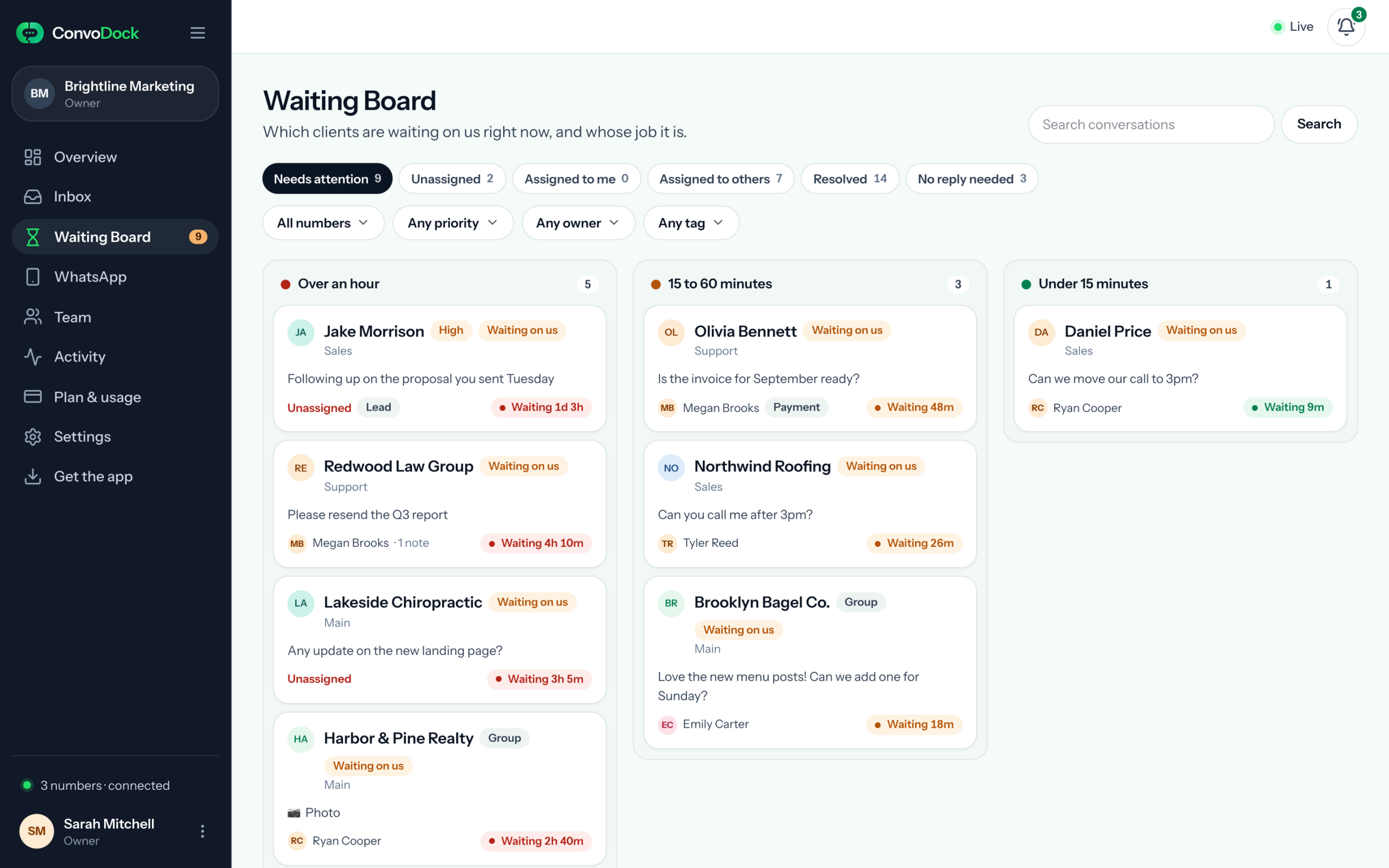
1d 3h · Jake Morrison, no owner yet
Assigned to Tyler
No reply needed · back when they write
Hand each chat to its person
Assign a chat to the teammate who looks after that client, so they can reply straight away. Their name shows on the chat and on the board, and unassigned chats stand out until someone takes them.
See who replied
In ConvoDock every reply shows which teammate sent it, while clients see your number as usual. The inbox marks the chats your team has replied to, and the Activity log keeps sends, number connections, assignments, access changes, tags and notes, with who did it and when.
Waiting Board
For anything still pending: every client whose last message has no reply from your team, how long they have waited, and who owns the reply. Filter it by tag and priority.
No reply needed
Clear a chat that needs no answer. It comes back on its own when the client writes again. A chat that never needs a reply, like your team’s own group, can be hidden from the board altogether.
On the office screen
Show the board on a TV with a private link: who is waiting, who owns the reply and for how long. Never phone numbers, messages or notes.
02 · Team and access
Share the chats. Not your phone.
Everyone signs in with their own login, so nobody needs your phone or your WhatsApp. You decide what each person sees.
Five roles
Change any time
- Owner Runs the workspace and its team.
- Admin Manages people, numbers and settings.
- Sub-admin Looks after the numbers they are given. Growth plan.
- Agent Replies to clients and works the board.
- Viewer Follows conversations without sending. Free.
Number and chat-level access
Give each person whole numbers, or only the chats you hand them, so the sales team stays in sales and a freelancer sees only their own client.
Hide customer phone numbers
Let an agent work a chat by the client’s name without ever seeing their WhatsApp number. More on how we protect your data.
Tags and priority
Tag chats as client, lead or anything you like, set a priority, and filter the board by both.
- client
- lead
- High
Internal notes
Leave context on a chat for the next person. Clients never see notes.
Works with Claude and ChatGPT
Connect Claude, ChatGPT or another AI app that supports connectors (MCP), then ask it about your client chats in plain words: who is waiting, what a client asked for, or “give this chat to Neha”. It works as you, with your permissions, and can never send a WhatsApp message: a reply it writes waits in the chat for a person to send.
03 · The inbox
Every number, one shared inbox.
Your team works from one list of conversations, whichever number the client wrote to.
Every number, one workspace
Main, sales and per-client numbers side by side. Add another number any time: connecting one takes about a minute.
- Main
- Sales
- Support
Shared inbox · All numbers
- Summit Dental GroupMain
- Jake MorrisonSales
- Harbor & Pine RealtySupport
- Brooklyn Bagel Co.Main
Groups and one-to-one chats
Client groups and direct chats sit in the same list, so a group is never someone else’s problem. In a group, every message shows who sent it.
- Can we move Thursday’s shoot?
- Yes, Friday 11am works.
Search and filters
Search by name or by what was said. Filter by number or tag, or switch to Unread or Mine in one click.
invoice
- All 42
- Unread 3
- Mine 9
Names, not numbers
Chats show the name saved on your phone. Owners and admins can rename a conversation for the team without changing it on WhatsApp.
+91 98765 43210
Priya, Summit Dental
Text, files and media
Send and receive messages, images and documents. A file you receive is fetched when someone opens it, then kept privately with your workspace.
March-invoice.pdf
- Sending
- Sent
Scheduled messages
Write it now and send it at 10am Monday. Scheduled sends follow the same limits as a live reply.
Mon 10:00
- Queued
- Sent
Live from the moment you connect
Your existing chats appear as soon as a number is connected, and new messages land in the shared inbox within seconds.
Older messages when you need them
Open a conversation and load what came before you connected, a page at a time, from the phone. How far back you can go depends on your plan.
Questions teams ask.
Anything else? Email hello@convodock.app and a person will answer.
Do my teammates need my phone or my WhatsApp login?
No. You connect your number once, from your own phone, and it stays there. Everyone you invite signs in to ConvoDock with their own login and works only in the numbers you choose, or only in the chats you give them if they are an agent or viewer.
Can several people reply from one WhatsApp number at the same time?
Yes. Connect the number once and everyone you invite works from the same shared inbox, each with their own login. Every chat shows its owner, and every reply sent from ConvoDock shows which teammate sent it, so everyone can see whose client it is and who already answered. How this compares with the WhatsApp Business app.
Can I limit an agent to certain chats?
Yes. Choose which numbers each person works in, then give agents and viewers either every chat on those numbers or only the chats you hand them. They see nothing outside that, in the inbox, on the Waiting Board or in search.
Can I hide customer phone numbers from agents?
Yes. Switch it on for any agent on the Team page. They still see the conversation and the contact’s name, never the customer’s WhatsApp number.
Can I use ConvoDock with Claude or ChatGPT?
Yes. Open Settings → AI apps in ConvoDock and copy the connection address. In Claude, add it under Settings → Connectors → Add custom connector; in ChatGPT, add a connector from its settings. Then sign in with ConvoDock and allow it. The app works as you: it reads only the numbers and chats you can see, never phone numbers hidden from you, and unless you are a viewer it can assign chats, add tags and notes, and change status or priority. It can never send a WhatsApp message: a reply it writes waits in the chat for a person to send. Everything it does shows in the Activity log, what it reads goes to that app’s company under its own terms (see our Privacy Policy), and owners can turn AI apps off for the whole workspace.
Can I show the Waiting Board on an office screen?
Yes. Owners and admins can turn on a private display link. It lists who is waiting on your team, longest first, with the client’s name, the number they wrote to, who is assigned and how long they have waited. It never shows phone numbers, message text or notes, and turning the link off stops it at once.
Can I schedule WhatsApp messages?
Yes. Write a message in any chat, pick a date and time, and ConvoDock sends it from that number. Scheduled messages follow the same sending limits as a live reply. See every way to schedule WhatsApp messages.
Can I see messages from before I connected a number?
Yes. Your existing chats appear as soon as a number is connected. Open a conversation and ask for older messages, and they load from the phone a page at a time. How far back you can go depends on your plan, and the phone has to still have them.
See it with your own numbers.
Connect your number, hand one client to a colleague, and see who replied by tomorrow morning. Free for 7 days, no card.